Reminders & the daily brief
The two messages Dhaga sends you: one daily summary at a time you pick, and a nudge before a meeting or timed follow-up — by email, or chat on Power.
Most of Dhaga waits for you. Two things don't: the daily brief, one summary of the day sent once, and a nudge, a short message shortly before one thing you're meant to be at. Everything else on this page is about when those two arrive and where.
The daily brief
The brief is one message a day carrying whatever you've switched on: follow-ups due or overdue, birthdays and anniversaries coming up, AI confirmations waiting, and who to reach out to today. Each section has its own switch under Suggestions in Settings — they are parts of a single message, not four separate emails.
On a day with nothing in it, nothing is sent. There is no "you have nothing today" message.
Pick the time it lands
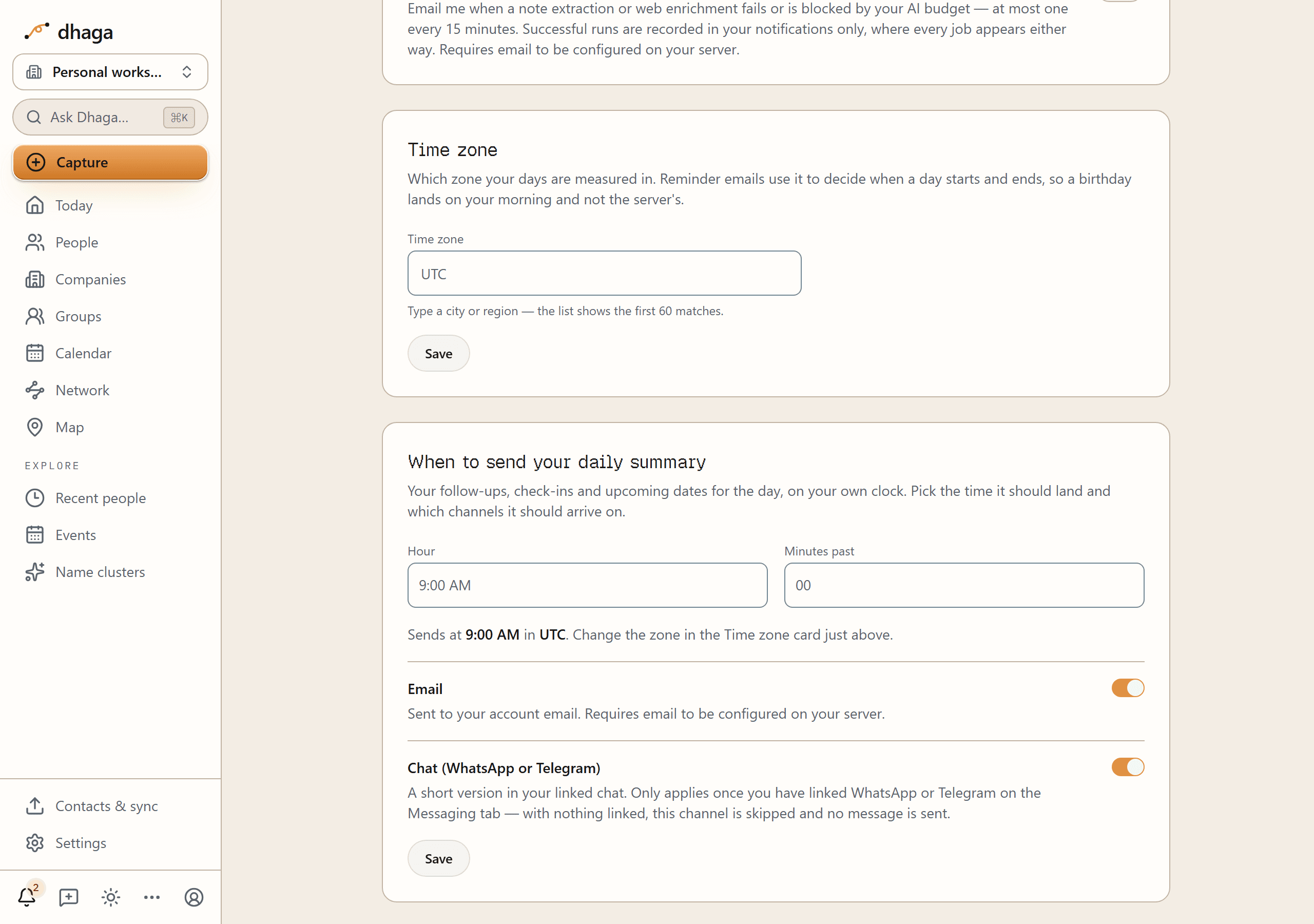
Settings → Suggestions → When to send your daily summary decides when. Pick
an Hour and how many Minutes past it — on the quarter hour: 00, 15,
30 or 45 — and the line underneath reads your choice back to you:
Sends at 9:00 AM in UTC. Change the zone in the Time zone card just above.
Nine in the morning is what you get if you never open the card.
The zone in that sentence is your time zone, set in the card directly above this one — the two sit together because a time means nothing without one. That placement is the whole point of the minute picker, too: India is UTC+05:30 and Nepal UTC+05:45, so "nine in the morning, where I am" is not a thing that can be said in whole hours.
Two honest details about the timing:
- It's the first quarter hour at or after your time, not the exact minute. Dhaga checks every fifteen minutes and sends on the first check once your time has passed, so a brief set for 9:00 arrives at 9:00 and one set for 9:15 arrives at 9:15 — but a slow or missed check means the next one sends it, not that you lose the day.
- A once-a-day backstop can reach you earlier. Dhaga also has a single daily run that exists so nobody is ever dropped, and it doesn't consult your chosen time. In a few time zones it comes round before the hour you picked, and your brief arrives on it instead. You still get exactly one a day.
Self-hosted deployments schedule this themselves
Choosing a send time needs a job that runs several times an hour, and nudges need one that runs every minute. On a self-hosted enterprise deployment both are the operator's to schedule. Until they are, the send time is stored with no effect and the brief goes out on the single daily run. Pre-event nudges are a hosted feature and aren't queued at all on a core-only deployment. See Self-hosting.
Choose where it arrives
Under the time pickers are two switches, and you can have either, both, or neither:
- Email — the full brief, sent to your account email. Needs email configured on the instance.
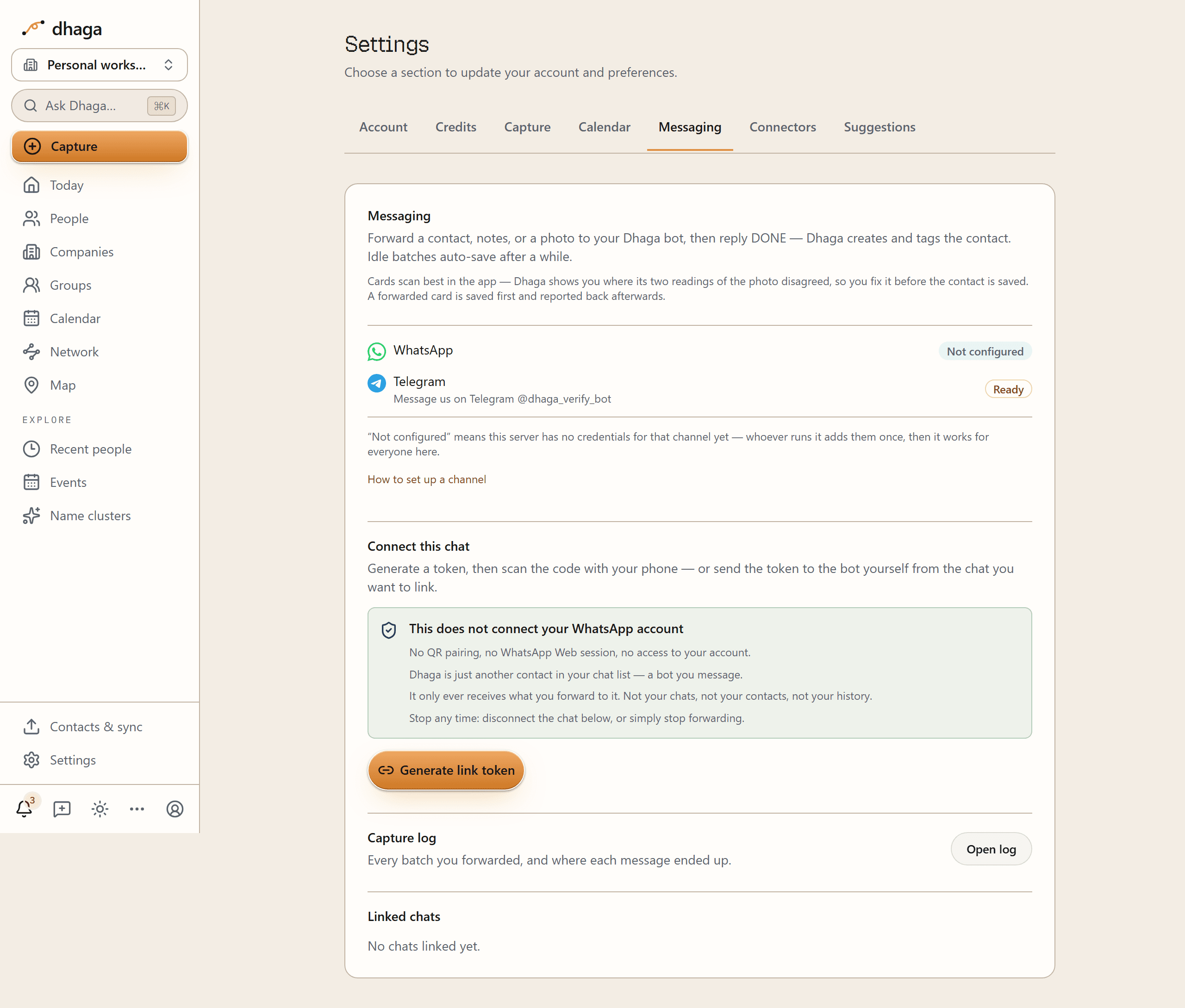
- Chat (WhatsApp or Telegram) — a short version in the chat you've linked on the Messaging tab. With nothing linked, this channel is simply skipped and no message is sent.
They're independent: one failing never costs the other its send, and you can't end up with two copies of the same day.
Linking the chat itself happens on the Messaging tab, and it's the same link that lets you forward things to Dhaga — see Messaging capture. The tab also tells you which channels this instance has credentials for at all: a channel marked Not configured has nothing to link yet.
What the chat version leaves out
The chat brief is not a second brief — it's the same sections written for a different surface. An email is a page you chose to open; a chat message is a notification on a lock screen. So the chat version is deliberately thinner:
- Names and counts only. No note text, no follow-up wording, no date labels — nothing you typed about another person. That's not about you: a chat message leaves Dhaga for WhatsApp's or Telegram's systems, and a line of your own words about a third party says far more about them than the fact that they exist. The email stays on Dhaga's own send path and carries the detail; the chat message carries the cue to go and read it.
- At most five names a section, then a
+N moreline, so a shortened list never reads as a complete one. - Follow-ups due and important dates only. Confirmations waiting and today's reach-out suggestions are email-only — they're the sections that can't be reduced to a name without becoming meaningless.
Every chat brief ends with a link into the app, because everything it left out is in there.
A nudge before the thing itself
Dhaga knew exactly when your meetings and timed follow-ups were and used to say nothing until the next morning's brief. It now sends a short nudge before the thing starts — ten minutes ahead unless you say otherwise.
What gets one:
- A follow-up with a time of day on it. A follow-up dated but not timed is a whole day, and "starts in ten minutes" against a day you never chose is noise — those stay with the daily brief.
- An event on a calendar you've connected, as long as it isn't an all-day entry and has a title.
Changing how far ahead
Ten minutes is the default, not the rule. Under Settings → Suggestions, When to nudge you before something starts sets it for everything: at the start, five, ten, fifteen or thirty minutes, an hour, two hours, or a day before. Pick one, save, and the next nudge uses it.
If you already told Google or Outlook to remind you thirty minutes before a particular meeting, Dhaga uses the setting you already made rather than asking you to say it twice — that meeting's own reminder wins over your default. And a meeting whose reminders you deliberately removed gets no nudge from Dhaga either — removing them was the instruction.
Three limits worth knowing:
- The lead time is one setting for everything. You can't give a single follow-up its own lead time. Everything without a calendar reminder of its own arrives at whatever you chose.
- Dhaga's own events don't get one. Events you create in Plan without connecting anything live only in Dhaga, and pre-event nudges read a connected calendar.
- A badly late nudge is dropped, not caught up. If delivery is interrupted for long enough, a nudge about a meeting that has already started is worse than silence, so it isn't sent. You won't get twelve pings at once for a morning that's over.
Completing, deleting or rescheduling something calls its nudge off. Dhaga looks a few hours ahead for what's coming, and checks for anything to send every minute — so a meeting added to your calendar in the last minutes before it starts may be too late to be nudged about at all.
Where a nudge arrives
A nudge needs no calendar for a timed follow-up, and it goes to one place:
- Your linked chat (WhatsApp or Telegram) on Power.
- Email if your plan doesn't include proactive chat (see below), or if you have no chat linked and you've turned on the morning follow-up reminder email in Settings. Dhaga does not email you a nudge you never asked to be emailed.
- With no chat linked and that email switched off, the nudge isn't sent at all — the reminder still shows in the bell and on your Plan page, and Dhaga doesn't keep retrying it.
Ask for one in chat
In your linked chat you can say "remind me in 16 minutes" — or "ping me in an hour to call the bank" — and get exactly that. Dhaga answers with the clock time rather than repeating the offset back at you — "I'll remind you at 16:41" — because a time is proof it read your words in your own zone. It also becomes a real task on Plan, not just a ping.
Two things to know:
- It takes a duration, not a date. "In 20 minutes", "in a couple of hours" — yes. "Tomorrow at 5" or "on Thursday" is not a timer, and is captured as an ordinary follow-up instead. Dhaga never invents a duration you didn't say.
- One minute to a week. Ask for longer and it's captured as an ordinary follow-up too, with a real due date — which is better, because that shows up on Plan, in the brief and on your connected calendar, none of which a one-off ping appears on.
Snooze one you've just had
Every nudge that can name what it's about ends with the same offer: reply 10 min, 30 min, 1 hour or tomorrow and Dhaga sends it again. Those are suggestions rather than a menu — "in 10", "half an hour" or "in the morning" are understood too.
Tomorrow means your daily brief's own hour, next time it comes round — so snoozing at 6am with a brief set for 8am gets you a reminder at 8 this morning, not tomorrow's.
Two things snooze deliberately doesn't do:
- It doesn't move the follow-up. Its due date on Plan is untouched; you've postponed the reminder, not the work.
- It doesn't reach back. A snooze reply refers to the nudge you were most recently sent, for up to an hour. After that there's nothing it can safely be about, so Dhaga says so rather than guessing, and your message is captured like any other.
Proactive chat is part of the Power plan
The brief and the nudges arriving in WhatsApp or Telegram are a Power feature. It's the one capability that separates Power from Pro.
On Free and Pro the same brief and the same reminders arrive by email instead. Nothing is lost and nothing was taken away — a linked chat keeps capturing everything you forward to it exactly as before, and disconnecting one still works on any plan.
The line is drawn around Dhaga starting the conversation, not around what a message costs to send. That's why it covers Telegram as well as WhatsApp, even though Telegram sends cost nothing — otherwise the feature would simply be free to anyone who linked the other channel.
In Settings the chat switch stays visible and greyed rather than disappearing, with the reason beside it:
Getting your daily summary and meeting nudges in WhatsApp or Telegram is part of Power. On your plan they arrive by email instead, and your linked chat keeps capturing everything you send it.
Your setting is remembered while it's greyed, so upgrading turns it on again rather than asking you to set it up a second time.
If the plan can't be checked, you get email
The check fails closed on purpose. If Dhaga can't work out what plan you're on, it sends the brief by email rather than assuming you have a feature you may not have bought — and it emails you even if you'd switched the email channel off, because delivering nothing at all is the worse answer.
A monthly limit on WhatsApp only
There's one further bound, and it applies to WhatsApp alone. If a very large number of Dhaga messages have gone to your WhatsApp inside one calendar month, Dhaga tells you once — subject "Your Dhaga updates are coming by email for now" — and the rest of that month's briefs and nudges arrive by email. WhatsApp resumes when the month rolls over, and replying to the bot works exactly as before throughout.
That's a separate mechanism from the plan above, and the two don't overlap: Telegram is never counted, replies to something you sent are never counted, and the notice is sent once a month rather than once a message.
On WhatsApp, a quiet chat gets a nudge that can't say what it is
WhatsApp only lets Dhaga send a freely-worded message within 24 hours of your last message to the bot. Outside that window it must use a pre-approved template, and template contents are submitted to and rendered by Meta — so a meeting title or a follow-up's wording, which is your notes about somebody else, must never become one.
The result is honest but blunt: if you haven't written to the bot in a day, the nudge says only that you have "something coming up shortly" with a link into the app, and it carries no snooze offer, because there's nothing named for a reply to refer to. Telegram has no such window and always names the thing. Emailed nudges are worded carefully for the same reason — the subject reads "Coming up shortly" and the body says what it is, because a subject line renders on a lock screen where someone else may be looking.
Next: the switches that decide what's in the brief live under Suggestions in Settings, and everything the brief summarises is on Plan.