Confirmations
A unified inbox for the doubts AI raises — when extraction is ambiguous it defers to a confirmation instead of guessing, and nothing touches your graph until you confirm.
When Dhaga is sure about what it extracted, it just writes it. When it isn't — a name that could be two different people, a web-sourced fact that might not be the right person — it doesn't guess. It parks the doubt as a confirmation and lets you decide. AI proposes, code disposes: the model only ever writes a confirmation row; your graph is changed by a deterministic resolver, and only once you say yes.
The /app/confirmations inbox is where those doubts collect. Confirmations
sits in the left nav with a small amber count pill when any are waiting.
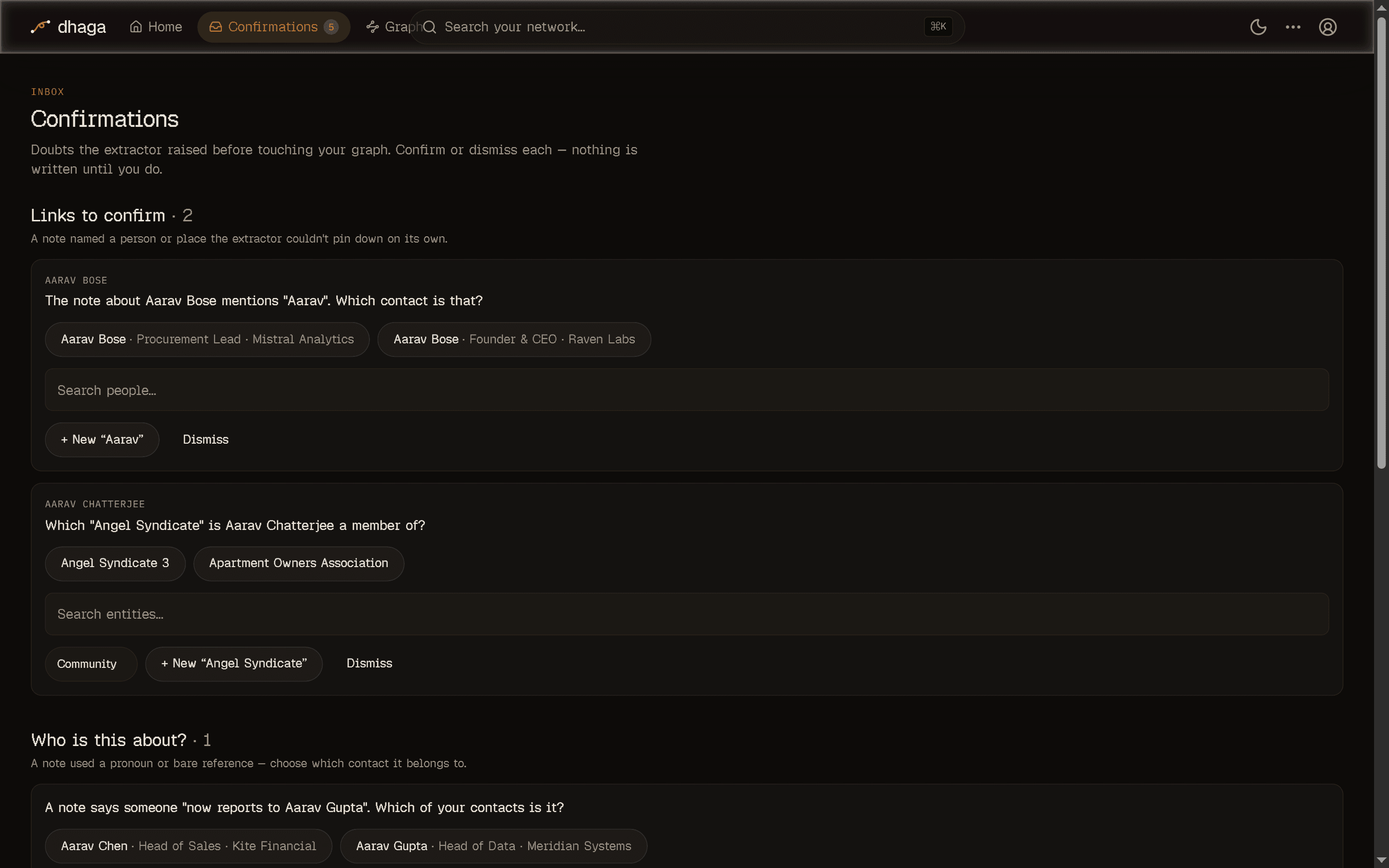
The four kinds of doubt
Each confirmation is one of four types, phrased as a plain question:
- Entity link — an ambiguous mention. You wrote "I know Ajay" and you have two Ajays; Dhaga asks which contact the relationship should point at rather than picking one.
- Subject resolution — the classic "who is he?". A note refers to someone by pronoun or a bare first name, and Dhaga asks which contact is the subject before wiring up the relationship.
- Enrichment match — a fact pulled from the public web that might not really be this person. Confirming clears the unverified badge; dismissing removes the fact.
- Supplement — a batch of newly-extracted facts and edges ready to fold into an existing contact, once you okay the addition.
Confirm or dismiss
Every row shows the question and — where relevant — the candidates to choose from.
- Confirm and the deterministic resolver applies the exact proposed action: it links the edge to the contact you picked, verifies the fact, or folds in the supplement. The action is stored on the confirmation, never re-derived from free text, so what you approve is exactly what runs.
- Dismiss and the doubt is discarded, changing nothing.
Nothing changes until you confirm
A pending confirmation has written no edge, fact, or relationship to your graph. That's the point — ambiguous extraction waits for you instead of leaving you to clean up a wrong guess later.
Where they surface
- Home shows a To confirm tile listing the first few pending questions, with a link straight through to the inbox. It only appears when something is waiting — it's an alert, not a fixture.
- The nav badge carries the pending count so you can see there's something to review without opening the page.
Get them by email
If you'd rather be nudged, turn on the Confirmations digest under Settings → Suggestions. It's off by default; once on, a summary of your pending confirmations goes out on the daily job. Like the other digests, it needs email configured on your server — see Settings and Self-hosting.
Notes & facts
Add notes to a person by typing or voice; Dhaga extracts structured facts automatically (or add facts and follow-ups by hand — no AI needed), keeps a receipt on each, and cascades deletions.
Enrich from the web
Search the public web for a person's footprint on demand — always user-triggered, cited on every finding, and saved as a note you can delete.